ScienceSeeker – A Better Way to Keep Informed?

For those of us interested in staying on top of the latest news in science, reading blogs can be a daunting task.   As Bora Zivkovic recently wrote on the Scientific American blog:

Over the years, the science blogosphere exploded in size. There are now thousands of science blogs (in many languages) and nobody can keep up with all of them. Thus, by this time last year, Scienceblogs.com was containing only a miniscule proportion of the science blogging community, and it is quite possible that it was not as representative as it used to be. Yet it was still a one-stop-shopping destination for many, including for the media.

Earlier this year, an interesting new science blog aggregator site started.  Called ScienceSeeker, it attempts to collect “science reporting, analysis, and discussion” in one place.  As they write on their “About” page:

ScienceSeeker is our effort to fill that void. We have collected hundreds of blogs in one place, and invite you to submit even more. Our goal is to be the world’s most comprehensive aggregator of science discussions, all organized by topic.

This site is a work in progress. Consider it to be the first step in our effort. Blogs are categorized according to a fixed list of topics. You can see lists of posts from those blogs, but since many bloggers have wide-ranging interests, some of the topics might not quite fit. Ultimately we plan on categorizing not by blog, but by individual post. We hope to have other ways of arranging posts as well: just the best posts, chosen by experts; the most popular posts; posts about particular events.

Do sites like this help get information out faster, or does it all get lost in the noise?  How do you keep track of the myriad of blog postings?

From eLearning to WeLearning

When you think about online education, what comes to mind? I often hear things like:

  • I don’t like online learning — I like to be in the classroom where I can interact with other students.
  • I’m too social for online learning — online learning is too isolating and lonely.
  • Online learning is boring.

How about you? Share your preconceptions about online learning by commenting on this post.

Online learning is also known as eLearning (electronic learning). But let’s consider a different proposition. What if we engage in WeLearning rather than eLearning, or even iLearning?

iLearning (“I” Learning) — I want or need to learn something. I get on my computer or smart phone. I “Google” or use some more scholarly search tool to look up the information I am seeking. I choose from the available sites and information that seem to meet my learning needs. I learn what I need to know, and I might even discover related topics I didn’t expect would pique my interest.

eLearning (one example) — My employer requires periodic training on topics sucs as sexual harassment, human subject research, or HIPPA. I receive an email message informing me that I must complete the training online by some specific date. I log in and work through the units — slides that cover the material, with an occasional multiple choice question to check my knowledge.

WeLearning — I elect to take a course online. The course is billed as collaborative. I log on the first time and am asked to post my introduction. I read and reply to a few introductions posted by others, and our conversation begins. Soon, we become a community of learners. We are expected to use forums to sustain ongoing dialogue. We are expected to post assignments and then give and receive feedback among our scholar colleagues and faculty. We may be required to complete group projects. We learn with and from one another.

There is a time and a reason for each of these models, and many more. Designing Clinical Research for Students and Residents ONLINE is WeLearning.

CTSI Embarks on Fully Asynchronous Online Learning Journey

August 1, 2011 marks the official start date for Designing Clinical Research (DCR) for Students and Faculty. The majority of scholars will assemble on Monday and Wednesday mornings in the traditional lecture hall at the Parnassus campus. Twenty self-selected learners will take the course completely online via the UCSF Collaborative Learning Environment, AKA Moodle.

The online course site was made available to students at noon on Tuesday, July 19. At 4:14 pm that same day, the first student logged in, explored the site, and posted an introduction. By 6:00 pm, two more students showed up and began to interact with each other. Remember! The course does not officially begin until August 1.

This course about research also doubles as research. Co-faculty, Kirsten Bibbins-Domingo, MD, PhD and Deborah G. Grady, MD, MPH along with researchers, Sarah Wilson, MD and Lawrence Haber, MD, as well as instructional designer and online learning consultant, Chrisanne N. Garrett, MAED will study the first offering of the online course. This small pilot study aims to answer the following question: how do learning outcomes, including knowledge and skill acquisition, and learner satisfaction compare between health science students who take the online DCR course and students in the traditional course?

The DCR course is structured to foster the development of students’ ability to write a clinical research proposal. For the final assignment, students write a five page proposal of their research study. We plan to take the twenty proposals written by the online students and compare them to twenty proposals randomly selected from the traditional course. Two K Program scholars, blinded to the author of the proposal, will read all forty proposals and rate the proposal based on the NIH scale of 0-9. We will then compare the scores of the online students to the scores of the traditional students. Additionally, we will collect formative and summative evaluation data from the online learners on both learning progress and satisfaction with the online learning environment.

This blog will serve as an ongoing report on the online course and, ultimately, on the results of the research study. Your questions and comments are most welcome.

“Using Prizes to Spur Open Innovation”: The National Institutes of Health (NIH) Explore Potential Approaches

This week’s NIH conference “Crowdsourcing: The Art and Science of Open Innovation” could be a hint that the research agency is seriously considering new ways to take advantage of the “processing power of lots of willing brains”.

ScienceInsider published a summary report that states:

NIH Director Francis Collins would soon sign papers that would ensure NIH is compliant with the America COMPETES Act, which gives federal agencies the authority to offer cash incentives for researchers to tackle high-risk, high-reward research questions that have eluded more traditional funding platforms, such as grants and sponsored research.

The America COMPETES Act was first passed in 2007 and was reauthorized in December. Under its authority, federal agencies outline a problem they’d like solved on Challenge.gov, then open the competition to individuals or teams, evaluate the results, and award a money prize to whoever turns in the best solution.


LabLife.org – A Model for a Future Research Portal at CTSI, and perhaps even UCSF?

This site is interesting because it helps researchers perform a variety of tasks and supports their online community. At the same time, it provides clear paths to access more information without overwhelming the user. And btw, the goal of the site is easily comprehensible.

LabLife is free for academic labs. We recently learned that UCSF postdocs are using it frequently. And they’re not the only ones, according to LabLife over 1800 labs from 1200 institutions world-wide are using the site.

Here are a few examples how the site supports several aspects of a researcher’s lab life:

  • searching for products,
  • coordinating purchases (preventing ordering mistakes),
  • managing (tracking) reagents, documents, and data,
  • searching for jobs and publications, and
  • sharing information with colleagues and the community.

What do you think?

Cigarette warning labels around the world

The FDA’s new cigarette warning labels have been getting a lot of buzz, underscoring the role of design in public health communication. The new designs take up half the cigarette pack, and 20% of the size of ads. According to the Wall Street Journal, the FDA estimates that the design will reduce the number of smokers by over 200,000 in the first year after launch, based on the impact of new warning labels in Canada.

Cigarette Health Warning ImagesCigarette Health Warning ImagesCigarette Health Warning ImagesCigarette Health Warning Images

There are a variety of approaches to tobacco packaging warnings, but bold graphic warnings are clearly the emerging international consensus. Here are some examples from around the world:

Brazil:
Cigarette warning labels

Thailand:
Gruesome

Click to see more…

Pfizer Announces First U.S. “Virtual” Clinical Trial Allowing Patients to Participate Regardless Of Geography

The randomized pilot study, called REMOTE, uses mobile phone and web-based technology (e.g. electronic diaries, online testing tools, a dedicated website) to collect the necessary data for the trial without clinic visits.

Investigators plan to enroll about 600 patients from about 10 states across the United States. Pfizer will compare results to previous clinical trials and assess whether virtual trials can save time and obtain the same results as traditional ones, or perhaps even more reliable data through increased patient compliance, lower withdrawal rates and real-time data collection.

Although not all clinical trials could be done remotely, if this pilot proves successful, it might be an interesting model for our emerging UCSF-CTSI Participant Recruitment Service.

Watch the animated video that outlines the trial’s basics to patients

More information:

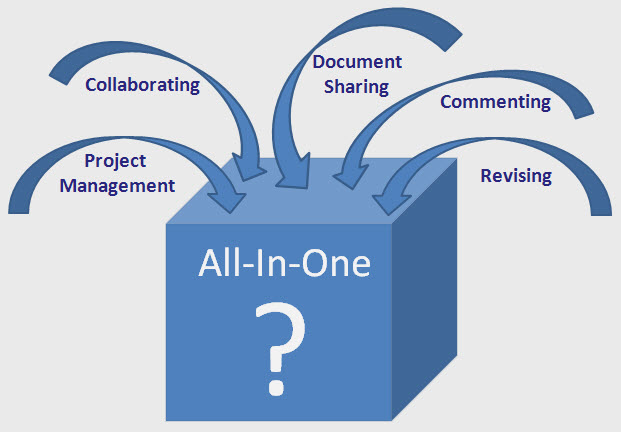
Researcher’s Bleg: Looking for a technical solution to enable project & document management, collaboration and revising

UCSF researcher Ralph Gonzales writes to get our advice regarding his Wiki-Whiteboard (or Wiki-Noteboard). Here is his description of what he is looking for:

Version 1.0. Lives on my iPad. A handwriting recognition program that allows one to organize documents into different notebooks (i.e., projects), and that allows one to attach different types of documents (Word, Powerpoint, PDF, scanned documents, etc.) to different locations on different pages and notebooks. Think about the “insert comment” function in Word… for this we would have an “Insert document” function. The mock-up/layout could actually resemble the word document, except instead it’s my handwritten notes with documents inserted. It would be nice to be able to insert documents directly from different sources such as email folders, as well has hard-drive.

Version 2.0. Lives on a server with all the same functions as above. Selected individuals could also access the specific Noteboards and provide comments to the notes or attached documents using something similar to “Track Changes” from Word… using the “Insert Comments section. You would have different colors for different individual’s comments.

Great question. Team, can we offer some ideas/recommendations?