Features vs. benefits

Perl‘s my language of choice. Perl’s a dynamic computer language, similar to Python or Ruby. There’s very little that you can do in Perl that other languages can’t do as well, but it has one huge killer feature—CPAN, a community-curated archive of tens of thousands of bits of pre-written open source code libraries. Without CPAN, Perl is just another language. With CPAN, Perl is a power tool that lets you deliver results lickety-split.

Perl developer chromatic breaks down the distinction between features and benefits when marketing Perl:

“The high point of the book so far—a technique I’ve used on three projects in the past week to great results—is to distinguish between technical features and customer benefits. In other words, while experienced Perl masters might say “Perl 5 is great because you have access to the CPAN”, that’s a feature. The benefit is that “80% of most programs has already been written”…While the as-yet unlaunched value analysis site a couple of us are launching for small investors has the technical feature “updates analysis after market close every day”, the benefit to customers is “gives you the best advice possible whenever you check it”.…My experience so far has been that the exercise of comparing features to benefits takes some time, but yields great results. Try it yourself; it’s easy. Grab a piece of paper and make two lists. On the left side, write all of the distinct technical features you consider worth mentioning. When you finish, write on the right side a benefit from the customer or user point of view corresponding to that technical feature. Sometimes there’s overlap, and that’s okay.” [via]

Read more:

Collaboration Success Wizard — want to test to see if your geographically distributed team is poised for success?

Collaboration Success Wizard.

Check this out … looks really interesting!

Here’s the description from the site:

Once a project is approved to participate [to use the Wizard], we send invitation e-mails to all the project members. The Wizard is an online survey that takes about 30 minutes. Each individual involved in the project should take the survey independently. The more project members who take the survey, the better the data!

And yes – it’s free!

At the end of the survey each participant can see a personalized individual report that contains feedback based on their answers and our research. This report is available immediately, and summarizes both the strong points and the issues at risk for the target collaboration.

How social proof works

We trust products and ideas that other people trust. Aileen Lee breaks down how social proof works in a guest piece on TechCrunch, breaking down the following categories:

Expert social proof

doctors for medicare

Celebrity social proof

Yao Ming

Individual user feedback social proof

Critical reviews (365:009)

Aggregate popularity social proof

Too many served

Friends’ recommendation social proof

Facebook hopes social proof with motivate users to clean their database

Read more:

Why Do Americans Use Social Media?

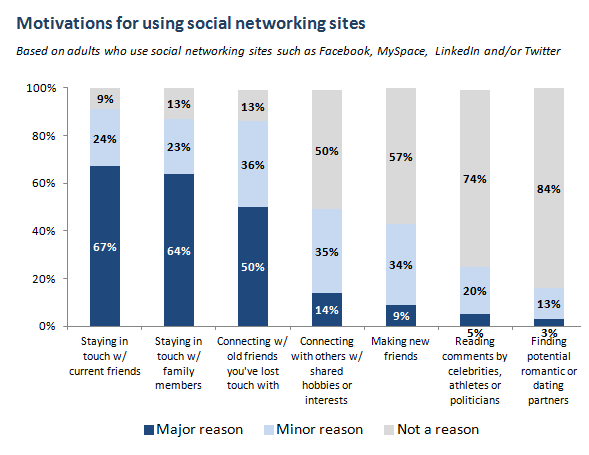
These days, “66%, two-thirds of online adults, use social media platforms such as Facebook, Twitter, MySpace or LinkedIn,” states the latest  PEW Research report.  And while we are thinking about how we can leverage social media at academic institutions to support research, for example to foster internal communication and knowledge sharing, the report adds numbers to some of the known reasons that motivate people to use social media.

(The 66%) say that connections with family members and friends (both new and old) are a primary consideration in their adoption of social media tools. Roughly two thirds of social media users say that staying in touch with current friends and family members is a major reason they use these sites, while half say that connecting with old friends they’ve lost touch with is a major reason behind their use of these technologies.

Other factors play a much smaller role: 14% of users say that connecting around a shared hobby or interest is a major reason they use social media and 9% say that making new friends is equally important. Reading comments by public figures and finding potential romantic partners are cited as major factors by just 5% and 3% of social media users, respectively.

See the full report for more details, including differences among age and ethnic groups when it comes to what they value most in social media.

Revamping Education: Where Are We Going With Online Learning?

Class Differences

How Online Innovators Are Disrupting Education” is the title of an interesting article published on the HBR blog that describes the rise of online learning in the U.S.

In fact, Education Department data from last year reported that “students in online conditions performed modestly better, on average, than those learning the same material through traditional face-to-face instruction.”

Other report findings include:

  • According to the 2010 Sloan Survey of Online Learning, approximately 5.6 million students took at least one web-based class during the fall 2009 semester, which marked a 21% growth from the previous year. That’s up from 45,000 in 2000 and experts predict that online education could reach 14 million in 2014.
  • Almost two-thirds of for-profit institutions now say that online learning is a critical part of their long term strategy.
  • The 21%growth rate for online enrollments far exceeds the 2% growth in the overall higher education student population.
  • Nearly one-half of institutions report that the economic downturn has increased demand for face-to-face courses and programs.
  • Three-quarters of institutions report that the economic downturn has increased demand for online courses and programs.

View the full report

Do You Suffer From Decision Fatigue? – NYTimes.com

Do You Suffer From Decision Fatigue? – NYTimes.com.

This is sort of off-topic, but I thought worth sharing.

A while ago, someone forwarded this article to me and I just re-read it. Interesting stuff – and some food for thought for how we work and deal with things during the day.

On the work front — the research suggests scheduling meetings in the morning versus late afternoon and not to be low on blood sugar may be the best plan for a good productive meeting.  I guess bringing those cookies to meetings could have a multi-pronged effect.  People love cookies and will be more apt to come to your meeting in the first place if there is food, and the glucose hit may help folks make better decisions.

On a  more personal note, I now know that the “low blood sugar excuse” that I give my kids and husband when I’m cranky has some science behind it.  At the end of a long day, I know to make sure I’m fueled up before the barrage of small decisions thrown at me by the kids when they get home.

No matter how big or small the decisions are during the day, if they all deplete one’s will power, I’ll be thinking a bit more about the advice at the end of this article:  “… people with the best self-control are the ones who structure their lives so as to conserve willpower. They don’t schedule endless back-to-back meetings. They avoid temptations like all-you-can-eat buffets, and they establish habits that eliminate the mental effort of making choices. Instead of deciding every morning whether or not to force themselves to exercise, they set up regular appointments to work out with a friend. Instead of counting on willpower to remain robust all day, they conserve it so that it’s available for emergencies and important decisions. “

Keys to a Successful Data Repository

Recently, Cameron Neylon posted an interesting article on his blog, reflecting on some of the challenges in building a data repository:

One of the problems with many efforts in this space is how they are conceived and sold as the user. “Making it easy to put your data on the web” and “helping others to find your data” solve problems that most researchers don’t think they have. Most researchers don’t want to share at all, preferring to retain as much of an advantage through secrecy as possible. Those who do see a value in sharing are for the most part highly skeptical that the vast majority of research data can be used outside the lab in which it was generated. The small remainder who see a value in wider research data sharing are painfully aware of how much work it is to make that data useful.

A successful data repository system will start by solving a different problem, a problem that all researchers recognize they have, and will then nudge the users into doing the additional work of recording or allowing the capture of the metadata that could make that data useful to other researchers. Finally it will quietly encourage them to make the data accessible to other researchers. Both the nudge and the encouragement will arise by offering back to the user immediate benefits in the form of automated processing, derived data products, or other more incentives.

He goes on to discuss how the system needs to be as simple as possible, and as automated as can be.  He also mentions a few tools that could help in this process.  All in all, required reading for those of us interested in this domain space.

Have you heard of the Crowdsortium?

It’s a group of currently more than 75 crowdsourcing industry practitioners that share “best practices, education, data collection and public dialog.” Interesting for us, as problems become more complex, the Consortium could be helpful in defining the right crowdsourcing model for future crowdsourcing needs at UCSF and CTSI.

The Crowdsortium aims to provide each of these constituents with the knowledge, data and best practices to get the most out of participating in crowdsourcing.

The Crowdsortium recognizes that the crowdsourcing ecosystem is comprised of five participants: funders, practitioners, customers, the crowd and researchers.

As the problems crowdsourcing address become more complex, so do the problems that the crowdsourcing ecosystem face.

For example:                                                                         THE CROWDSOURCING ECOSYSTEM

• What crowdsourcing model should we use?
• How do we handle intellectual property rights?
• How do we logistically manage international participants?
• How do we fairly reward participants for their work?
• What are the benefits of monetary versus non-monetary rewards?
• How can game mechanics influence crowd dynamics?
• Should the crowd be anonymous or individually identified with their real names?

Anyone may participate in the public forums, feeds and email lists related to this website, members, however, enjoy additional benefits. Membership is currently available for funders, practitioners, customers and researchers at no cost. More at http://www.crowdsortium.org/

New Online Lab Network at UCSF

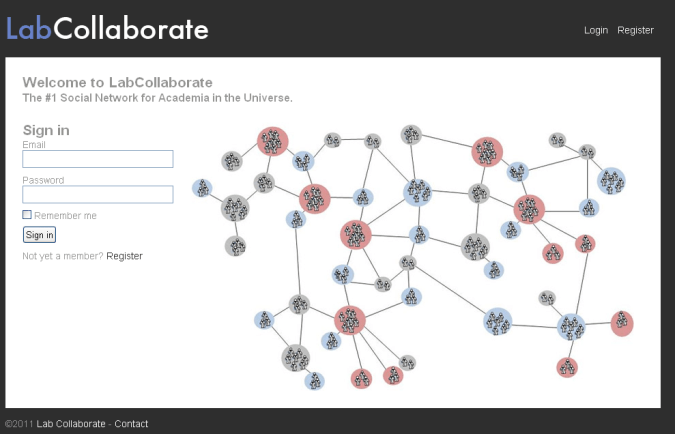
This morning UCSF’s McCormick lab announced the launch of LabCollaborate, a new website with the goal to “provide a way to easily share data, ideas and generally foster communication between labs as well as provide some useful tools for running the lab.”

I signed up to learn more about how it works. Here is what I have learned so far:

1. Lab Home Page: This is the page you see when you sign in. All the lab members profiles appear across the top, and you can see individual contact info and research interests (as well as update your own) by clicking on the pictures. As the first person to sign up the lab, you are an “admin”. Admins can add/remove lab members, edit library files and approve/delete friendships with other labs. You can extend these powers to any other user by clicking “Make admin” on their profile. If you want to.

2. Whiteboard: Here you can post comments or questions- they will be seen by your lab as well as your lab friends, but not by labs you are not friends with.

3. Friends: These are labs you want to keep in touch with and share data with. They can see and download all protocols, presentations and papers in your Library (unless marked “visible to my lab only”) as well as write on your whiteboard. A newsfeed to keep updated with what they’re doing is coming soon.

4. Libraries: These are collections of papers, presentations and protocols. Files can be tagged with keywords to organize into projects, ideas, lab members, whatever. And they are searchable! So you can group any number of protocols, literature references and presentations by whatever tag(s) you choose and find them all later with a simple search.

5. Ordering: The ordering system records vendor, quantity, and description as well as providing a direct link to the product page. It is also searchable to easily find past orders. Admins can mark orders as placed and the time of initial reqest and placement is recorded.

6. Find collaborators: The search box at the top of the page searches for words in the research interests of all labs and lab members on the network. So if you want to find other labs interested in “cancer”, just search and connect with new friends.

I am wondering whether – at some point – we can leverage the information LabCollaborate provides to enrich UCSF Profiles, and how on other hand LabCollaborate  can benefit from the UCSF Profiles data (tools).

I guess our tech team is aware of this. Looking forward to getting your thoughts, guys.